
Orbita: Ring Sizer by VIKOZA · iOS 17+
Ring sizer app: measure a ring on your iPhone screen
Orbita, by the VIKOZA jewellery house, turns your iPhone or iPad into a ring sizer: place a ring that fits on the screen, drag the circle to its inside edge and read the size in US, UK, EU, JP and mm. For anyone buying a ring online or as a gift who would rather not visit a jeweller just to be measured.

Why ring sizes are so easy to get wrong
- The shop lists a UK letter or a European number, you know your US size, and every conversion chart you open gives a slightly different answer.
- A ruler reads in whole millimetres, and half a millimetre of diameter is already half a size. One careless reading and the ring spins or will not pass the knuckle.
- Printable sizers only work if the printer did not scale the page. Half the time it did, and you only find out when the ring arrives.
- It is a gift. Asking for the size gives the surprise away, and guessing from the look of a hand almost never works.
How Orbita measures a ring
Put the ring on the screen
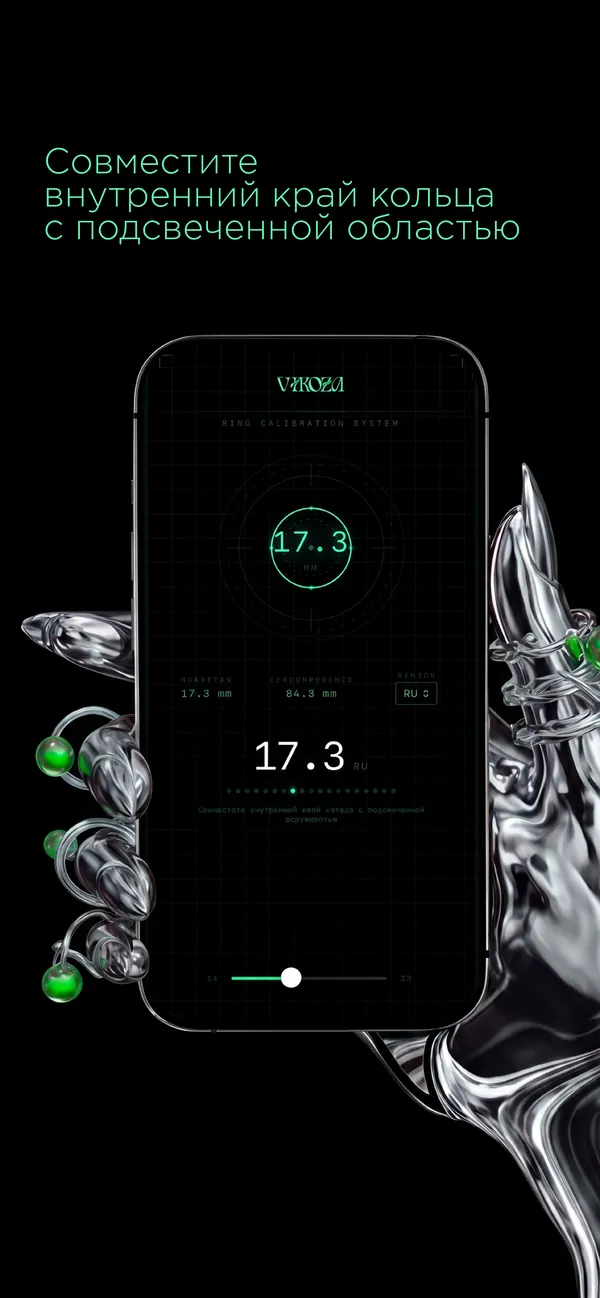
Place a ring that fits well on the display and drag the slider until the highlighted circle lines up with the inside edge of the band. The range is 14 to 23 mm of inside diameter in 0.1 mm steps.
True to scale on your device
Orbita converts millimetres to screen points using the physical diagonal of your iPhone or iPad model, so a 17 mm circle on screen really is 17 mm. There is no calibration step and nothing to hold against the glass.
Five size systems at once
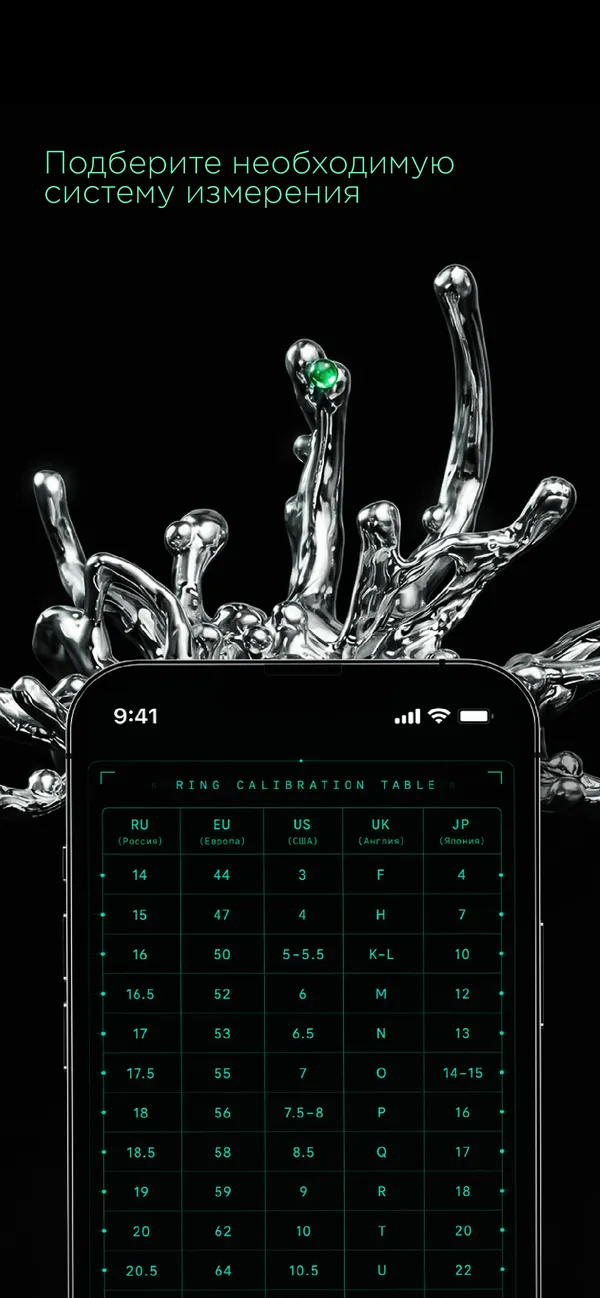
Under the circle you see the inside diameter and circumference in millimetres plus the size in the system you pick: US, UK letters, EU circumference (ISO 8653), Japanese numbers or Russian diameter sizes.
No internet, no account
The measurement and the conversion happen on the device. Open the app, place the ring, read the size. Nothing is uploaded and nothing to sign up for.
iPhone and iPad
Works on both, with the scale computed per model, so the larger iPad screen gives the same millimetres as an iPhone. Requires iOS or iPadOS 17 or later.
From a size to a piece
The "Choose a piece" button opens the VIKOZA jewellery house website (in Russian), where the size you just measured can go straight to a custom order.
Price
Orbita is free. There is no subscription and no in-app purchase: the sizer and all five size systems are available as soon as you install it.
Download on theApp StoreFrequently asked questions
How accurate is a ring sizer app on a phone screen?
Orbita scales millimetres to pixels from the real diagonal of your device model and moves the circle in 0.1 mm steps, which is finer than the gap between US quarter sizes. In practice accuracy comes down to how carefully you align the circle with the inside edge: look straight down at the screen and avoid rings with a heavy inner bevel.
Can I measure my finger with the app instead of a ring?
No. Orbita measures a ring that already fits by matching a circle to its inside edge. If you have no ring to copy, wrap a strip of paper around the finger, measure the length in millimetres and look it up in our ring size chart.
How do I convert a US ring size to UK or EU?
As a rough guide, US 6 is about UK L and EU 52, US 7 is UK N and EU 54, US 8 is UK P and EU 57. In Orbita you measure the ring once and switch the system in the region list; the app recalculates the size for US, UK, EU, JP or RU.
What is the Japanese ring size system?
Japanese sizes are whole numbers that start at 1 for a 13 mm inside diameter and grow by about a third of a millimetre per step, so a Japanese 15 is roughly 17.7 mm, between US 7 and 7½. Orbita shows the JP size alongside the diameter in millimetres.
Does Orbita need an internet connection?
No. Measuring and converting sizes happens on the device. The only thing that opens a web page is the "Choose a piece" button, which goes to the VIKOZA website.
Does the app work on iPad?
Yes. Orbita supports iPhone and iPad, and the on-screen scale is calculated from the diagonal of the specific model, so the circle is the same physical size on both. It requires iOS or iPadOS 17 or later.
How can I find someone's ring size without asking?
Borrow a ring they wear on the same finger for a few minutes and measure it: in Orbita that takes under a minute, with no trip to a jeweller. Other options are tracing the inside of the ring on paper or pressing it into a bar of soap and taking the impression to a jeweller.
Is Orbita really free?
Yes. There are no in-app purchases, subscriptions or paid features. The app is published by the VIKOZA jewellery house, and its "Choose a piece" button links to their website.
Guides and articles
How to measure your ring size at home
The most reliable way is to measure the inside diameter of a ring that already fits the right finger and look it up on a chart. If you have no ring, wrap a strip of paper around the base of the finger, measure the length in millimetres and convert; measure in the afternoon, not first thing in the morning.
Read →Ring size chart: US, UK, EU, Japan and millimetres
US size 7 is about 17.3 mm inside diameter, which is UK N to N½, EU 54 to 54.5 and Japanese 14 to 15. The chart below converts every half millimetre from 14 to 23 mm into all four systems; when charts disagree, compare millimetres, not size labels.
Read →More apps

Firm Ground
Walk through a parent's home and find what could cause a fall

Negatone
Film negatives and slides back in colour, one-time purchase

Kinfile
If something happens to you, your family knows what to do

Nightkit
CPAP replacement reminders on the Medicare schedule

Wink
Days left on your contact lenses, with timely reminders

PoolDose
Test numbers in, exact chlorine and pH doses out